

Lyra Recurring says Pipedrive is disconnected
Why you see "Pipedrive is disconnected. Nothing new is being created.", what it means for your activities, and how to reconnect.
What it means
Nobody in your account has a working connection to Pipedrive. Nothing was deleted: every recurring activity and every activity is still there. But no new activity is created until somebody reconnects.
Why it happens
The last connection was removed in Settings, the last person connected uninstalled Lyra Recurring in Pipedrive, or Pipedrive stopped accepting the last one that worked.
Fix it
-
Select Reconnect in the banner, or go to Settings.
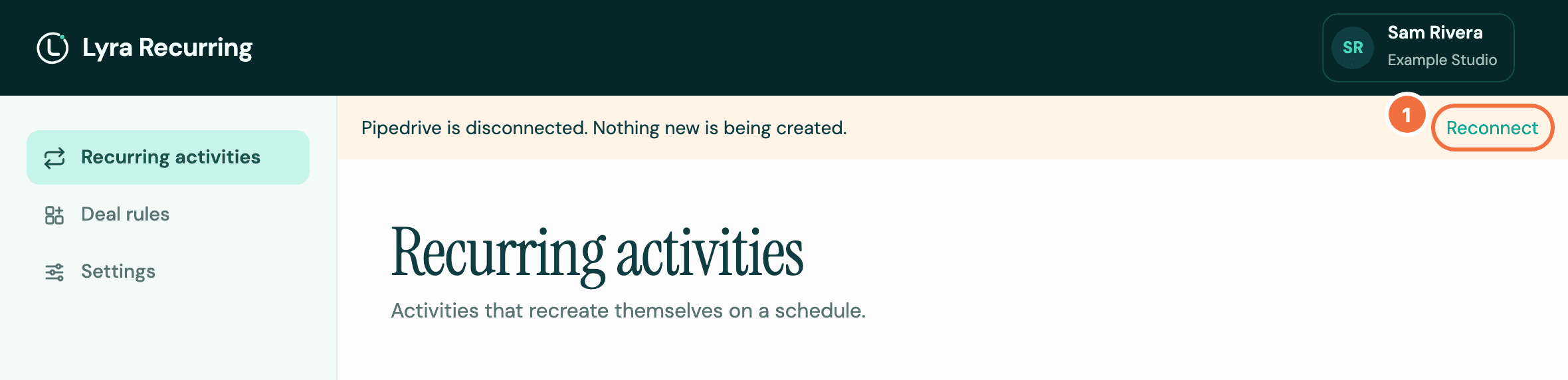
-
Select Connect Pipedrive.
-
Approve with your Pipedrive login.
Once connected, recurring activities start again. Those that follow the calendar create every activity they missed while disconnected, dated in the past. Those that wait for completion carry on from their open activity. If it was marked done or deleted in Pipedrive in the last 30 days, Lyra Recurring picks that up and creates the next one, which may already be past due. See I marked an activity done and the next one did not appear.
Only you need reconnecting?
If the panel in Pipedrive says Your Pipedrive connection needs reconnecting, your own connection stopped working but a colleague's still does. Activities are still being created. Reconnect when convenient, with the same steps.
A colleague can reconnect for everyone
Anyone from your Pipedrive company who connects, including someone new, reconnects the account.
If it does not work
I marked an activity done and the next one did not appear
The next one didn't show up after you marked a recurring activity done, or a recurring task was not created when you expected. Why, and how to get the next activity.
Questions about Lyra Recurring
Short answers about recurring activities in Pipedrive, your team, your data and the beta.