

An activity is not showing in Pipedrive
What each Push status means when an activity Lyra Recurring created has not appeared in Pipedrive, or a change has not reached it, and how to fix it.
Open the recurring activity and look at the Push column under Activities. Find what it says below.
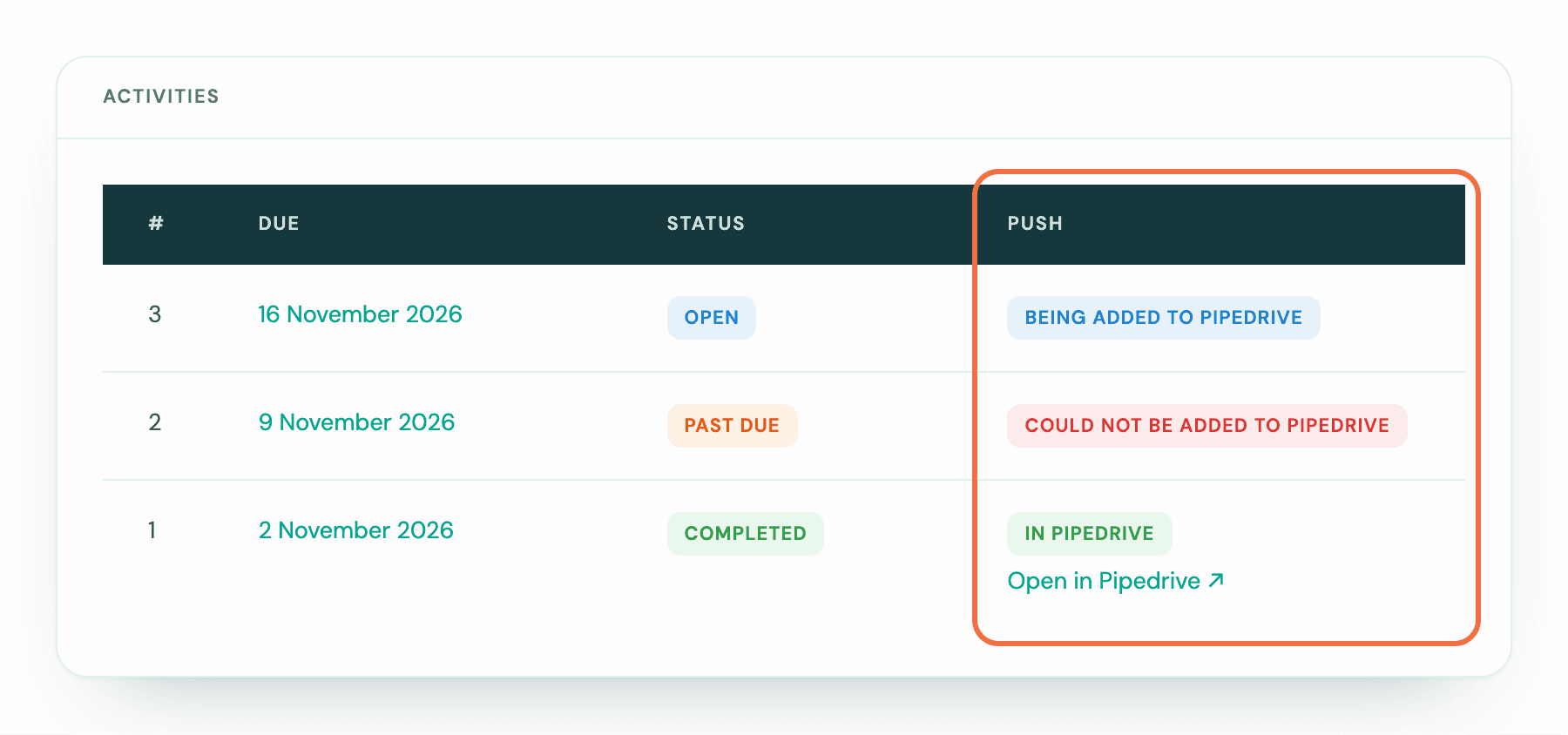
Not in Pipedrive yet, or Being added to Pipedrive
It is on its way. Activities are sent just after they are created. When Pipedrive asks Lyra Recurring to slow down, it waits and sends later. Look again later.
Not added — Pipedrive is not connected
Your account is not connected to Pipedrive.
- If it has never been connected, select Connect Pipedrive on Recurring activities. When you connect, this activity is sent if it is due that day or later. If its date has passed, add it in Pipedrive yourself. See Set up Lyra Recurring and connect Pipedrive.
- If it was connected before, go to Settings and select Connect Pipedrive. Activities created after that are sent; this one is not added later on its own. See Lyra Recurring says Pipedrive is disconnected.
Not added — no Pipedrive connection is working
Everyone's connection needs reconnecting. Follow the link to the settings screen and select Connect Pipedrive. Activities created after that are sent; this one is not added later on its own.
Could not be added to Pipedrive
Pipedrive refused it, and the line below says why. Lyra Recurring stops trying, so this activity is not added to Pipedrive later on its own. Write to support@lyrarecurring.com and we'll send it again.
A common reason is that the deal, person or organization it links to was deleted in Pipedrive. Edit the recurring activity and choose a record that exists, so the next activities can be sent.
If a deal rule made it and its deal was deleted, it has ended instead: its screen says Ended: the deal was deleted, and nothing more is created or sent.
If a deal rule made it and Pipedrive refused its first activity, its screen says Ended: Pipedrive refused the first activity and what to do. See A deal did not get its recurring activity.
In Pipedrive
It is there. Select Open in Pipedrive to go to it. If you still cannot find it, check its owner: it may be on a colleague's list.
Lyra Recurring never sends one activity to Pipedrive twice, however many times it retries.
Updating in Pipedrive
The activity is in Pipedrive, and a change you made to its recurring activity is on its way to it. Look again later: it reads In Pipedrive once Pipedrive has it.
Not updated in Pipedrive
The activity is in Pipedrive, but your last change to its recurring activity didn't reach it. Your change is saved, and the next activities use it. The recurring activity's page says The upcoming activity in Pipedrive wasn’t updated, and the line under the badge says why:
- Pipedrive refused the change: followed by Pipedrive's reason. Change the activity in Pipedrive.
- Pipedrive wouldn’t assign it to a colleague, or that colleague is deactivated in Pipedrive. Change the owner in Pipedrive, and choose someone who can be assigned for the next activities.
- The Pipedrive connection it uses has ended. Reconnect under Who has connected. Select Who has connected and reconnect, then change the activity in Pipedrive.
- Pipedrive couldn’t be reached. Lyra Recurring tried several times. Change the activity in Pipedrive.
- Pipedrive couldn’t find this activity. It may have been deleted there. There is nothing to change. If you still need it, add it in Pipedrive.
Saving the recurring activity again without a new change doesn't send it again.
If you write to us about an activity, include the recurring activity's subject and the activity's date.
A deal did not get its recurring activity
Why a deal won or moved into a stage did not get the recurring activity its deal rule should have added, and how to fix each cause.
A deal, person or organization does not appear when I search
Why the Owner, Deal, Person, Organisation or Type list on the form is empty, and what each message in it means.