

A deal did not get its recurring activity
Why a deal won or moved into a stage did not get the recurring activity its deal rule should have added, and how to fix each cause.
Select Deal rules in the menu, open the rule, and look for the deal under Deals. Find what you see below.
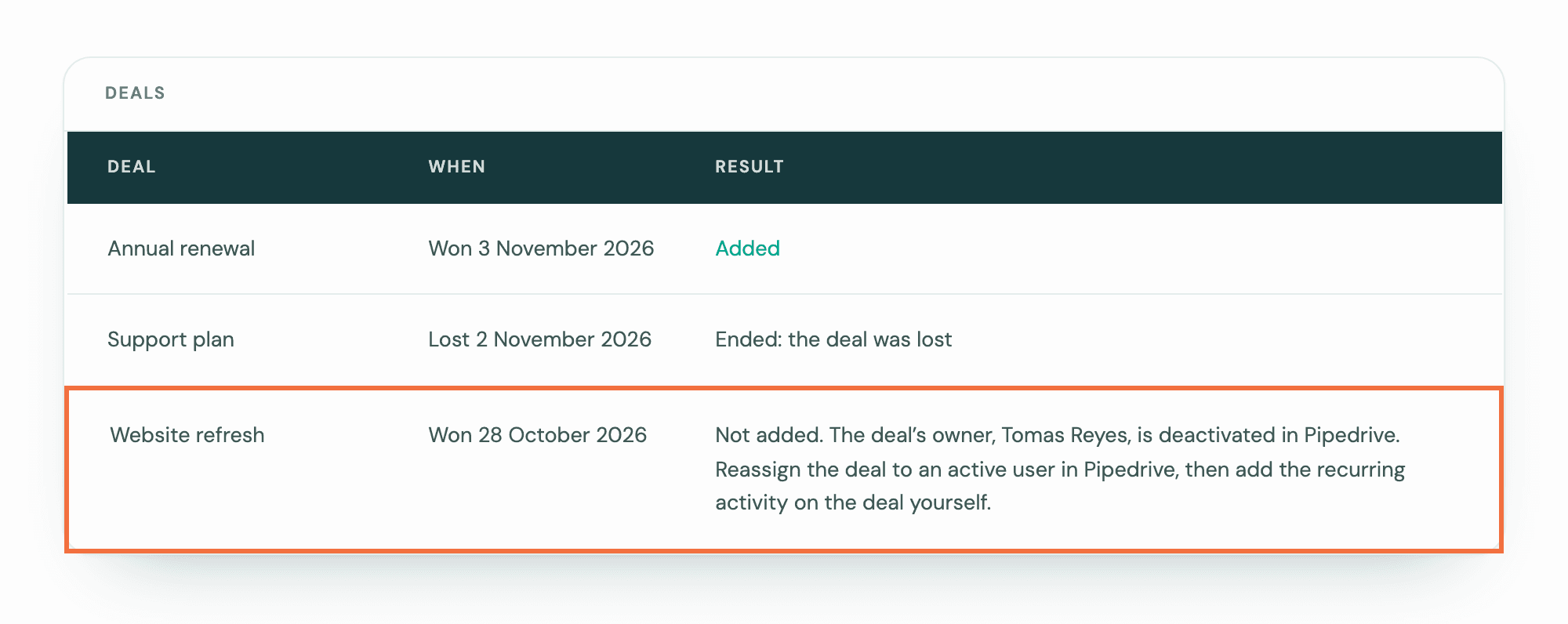
Not added
The row says why, and what to do:
- The deal's owner is deactivated in Pipedrive. Lyra Recurring checks the owner before it creates anything, so nothing was sent to Pipedrive. Reassign the deal to an active user in Pipedrive, then add the recurring activity on the deal yourself.
- Pipedrive refused the activity for another reason. Add the recurring activity on the deal yourself.
See Create your first recurring activity.
The rule does not try again for this deal. It tries again only if the deal reaches the moment again, for example won again after being reopened.
The recurring activity you add yourself is not made by the rule, so it does not end when the deal is lost. End or delete it yourself then.
Ended: the deal was lost, or Ended: the deal was deleted
The deal got its recurring activity, and it ended with the deal. If the deal is reopened and won again, or enters the stage again, it gets a new one.
An ended recurring activity can't be edited or started again. To keep following up on a lost deal, add a recurring activity on the deal by hand: no later loss ends that one. When the deal was lost, the open activity already in Pipedrive stays on the deal, so delete it there if you don't want it. Lyra Recurring shows it as Cancelled, but in Pipedrive it stays open until you delete it.
When the deal was deleted, Pipedrive deleted its activities with it. This is true of a deal deleted after it was lost too, though its row still says the deal was lost. If someone restores the deal in Pipedrive, within 30 days, its activities come back, but the recurring activity stays ended. The activities that come back are open in Pipedrive: delete them there if you don't need them. If the deal's Recurring activities panel shows nothing running, add one by hand.
The deal is not listed
Check these in order:
- It only just happened. Give it a few minutes.
- The rule shows Needs attention. Its pipeline, stage or label was deleted in Pipedrive. Select Edit and choose another.
- Deal rules shows the notice Pipedrive is not reporting deal changes. Rules still apply, but only once a day, so the deal can wait up to a day. Select Try again: it asks Pipedrive again for deal changes, and the notice shows Last tried with the time. If that fails, the once-a-day check still applies.
- The same notice reads: "No rule is on, but recurring activities your rules made still end when their deal is lost. Until Pipedrive reports deal changes again, that happens once a day, when Lyra Recurring checks recent deals, so it can be up to a day late." No rule is on, so no deal is waiting for one. A lost deal's recurring activity ends up to a day late. Try again works the same way.
- The daily check leaves deleted deals out, so one deleted while a notice showed is never caught up. If a deal was deleted while the notice showed, delete its recurring activity yourself.
- Deal rules says deal changes come through a colleague's Pipedrive connection, and that they are not a Pipedrive admin. Deals they can't see in Pipedrive don't get a recurring activity. Ask a Pipedrive admin to connect Lyra Recurring: deal changes move to their connection within a day.
- It reached the moment before the rule was on, or while it was off. Rules don't go back for those. Add the recurring activity on the deal yourself.
- It did not match. It is in another pipeline, or it did not have the label at that moment, or it went past the stage without entering it.
- It was already won when it entered the stage. enters stage counts only for open deals. Reopen the deal before you move it into the stage, or create it in the stage.
- It already has one running from this rule. A deal gets one at a time from each rule. Open the deal in Pipedrive and look at the Recurring activities panel.
- Pipedrive is disconnected. Select Reconnect in the banner. See Lyra Recurring says Pipedrive is disconnected.
If you write to us about a deal, include the rule's sentence and the deal's name.
Create the next activity only when the last one is done
Choose whether a recurring activity follows the calendar, or waits until you mark the previous activity done in Pipedrive.
An activity is not showing in Pipedrive
What each Push status means when an activity Lyra Recurring created has not appeared in Pipedrive, or a change has not reached it, and how to fix it.