

Delete a recurring activity, or bring one back
Stop a recurring activity by deleting it, see how many activities that cancels first, and restore it if you change your mind.
When you are done, the recurring activity creates nothing more. Activities it already created stay where they are, and you can restore it at any time.
Delete
- Select Recurring activities in the menu.
- Select Delete on its row, or open it and select Delete at the top.
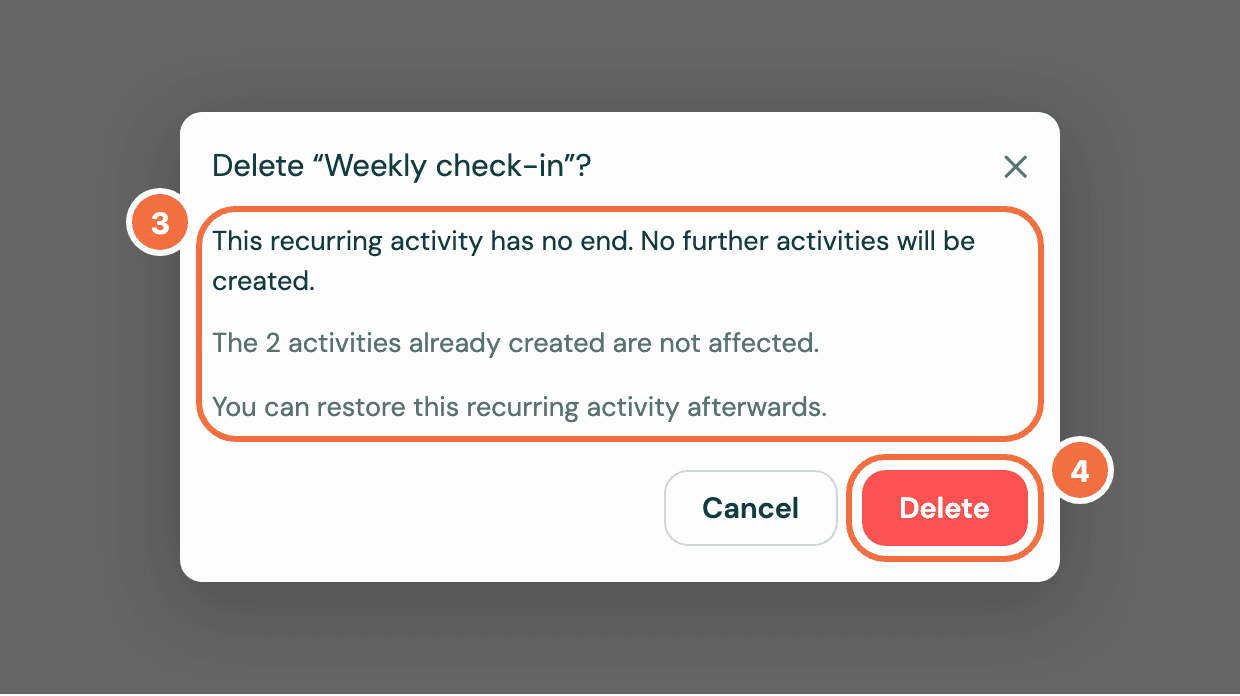
- Read the dialog. It says how many activities will not happen, and that the ones already created are not affected.
- Select Delete.
The activity that is already open, in Pipedrive or here, stays open and due on its date. Delete or complete it in Pipedrive if you no longer need it.
If a deal rule made it, the rule doesn't add it back. The deal gets a new one only if it reaches the rule's moment again, for example won again after being reopened.
Restore
- On Recurring activities, switch from Active to Deleted.
- Select Restore on its row.
Or open the recurring activity and select Restore in the box saying This recurring activity is deleted.
What a restore does
It picks up from the next date on or after today. Nothing is created for the dates that passed while it was deleted. Those count as skipped, so a recurring activity set to stop after a number of times does not get extra ones. If its end date passed while it was deleted, it comes back as Finished.
If a deal rule made it and its deal was lost while it was deleted, it comes back ended, not running. An ended one can't be started again: add a recurring activity on the deal by hand to keep following up.
If it does not work
- This recurring activity could not be restored. Try again. Try again in a moment.
- It is not under Deleted. Clear the search and filters with Clear all.
Contact Lyra Recurring support
Send a problem, a question or an idea to a person at Lyra Recurring from the app or from Pipedrive, and get the answer by email.
Change a recurring activity from inside Pipedrive
Edit a recurring activity from the Recurring activities panel on a deal, person or organization, without opening Lyra Recurring.