

Find a recurring activity in your list
Search and filter your recurring activities by subject, type, owner, deal, person, organization or date.
When you are done, the list on Recurring activities shows only the ones you are looking for.
- Select Recurring activities in the menu.
- Type in Search. It looks in the subject, note, public description and location.
- Narrow it with Type, or with Status: Still running or Finished.
- For more, select More filters:
- Repeats: Days, Weeks, Months or Years. One set to 12 months without Custom days reads Every year on its date in the list, and is found under Months.
- Creates the next one: Follows the calendar or Waits for completion.
- Ends: never, on a date, or after a number.
- Owner, Deal, Person, Organisation.
- Next activity created from and Next activity created to, Created from and Created to.
- To see deleted ones, switch from Active to Deleted.
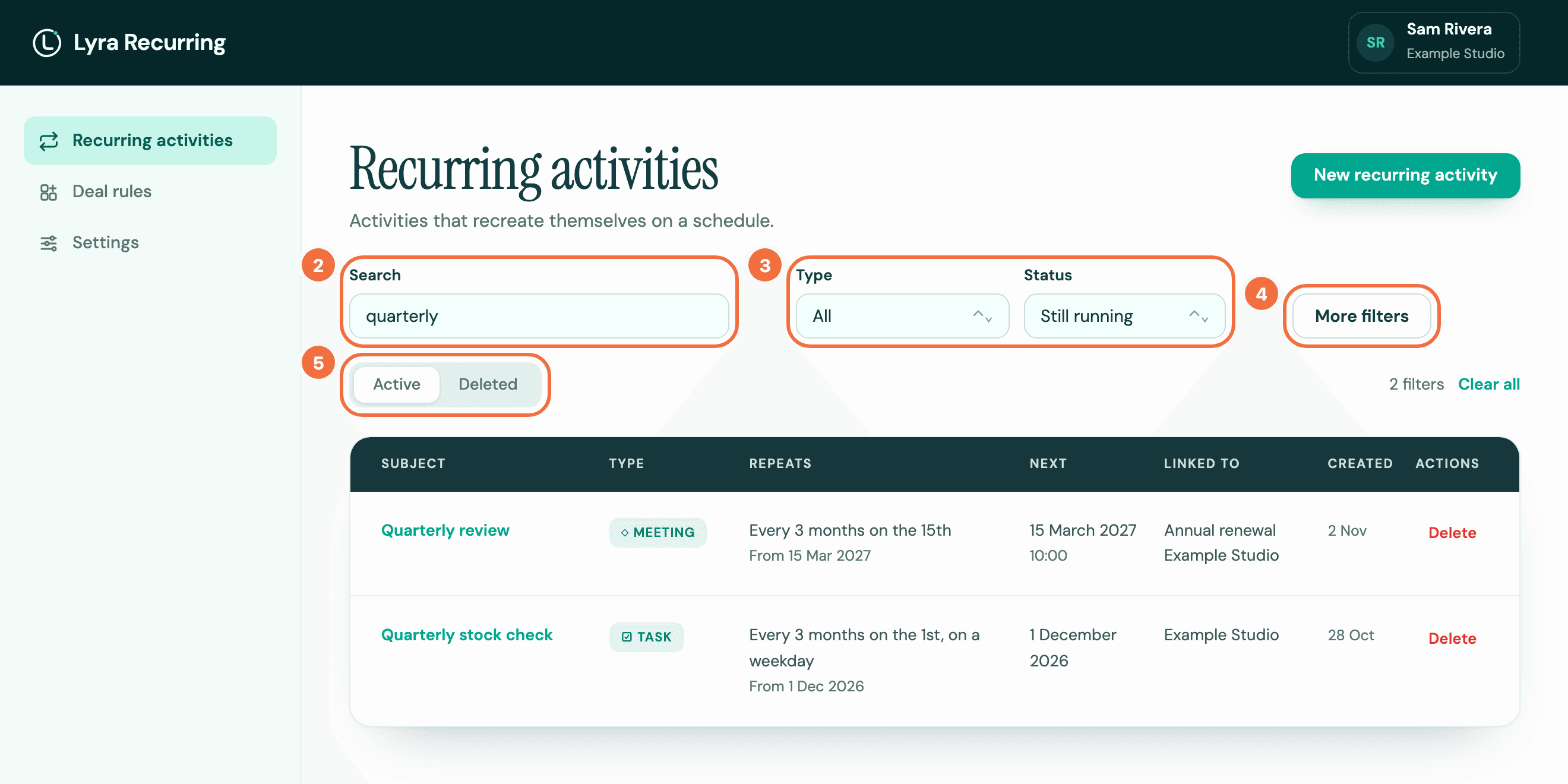
The number of filters in use shows above the list. Select Clear all to remove them.
Share a filtered view
Filters are kept in the page address, so you can bookmark a view or send it to a colleague.
What the list shows
Each row has the Subject, Type, how it Repeats (how often, and below it in grey when it runs), the date of the Next activity, with its time in a zone other than yours followed by that zone, for example 09:30, Los Angeles time, or UTC when it has none, what it is Linked to, and when it was Created. Select a subject to open it.
A sentence under a subject means Lyra Recurring could not check that recurring activity's open activity in Pipedrive. It says what to do. See I marked an activity done and the next one did not appear.
If it does not work
- No recurring activity matches these filters. Select Clear filters and narrow again.
- Your recurring activities could not be loaded. Select Try again.
Change a recurring activity from inside Pipedrive
Edit a recurring activity from the Recurring activities panel on a deal, person or organization, without opening Lyra Recurring.
Install Lyra Recurring from Pipedrive
What happens when you approve Lyra Recurring in Pipedrive, and which screen you should see at the end.