

Add a recurring activity to every deal that is won or enters a stage
Make a deal rule, and each deal won, or moved into a stage, automatically gets its own recurring activity for its owner.
When you are done, you have a deal rule: every deal that matches it gets its own recurring activity, for the deal's owner and linked to the deal, its person and its organization, as if someone had added it by hand.
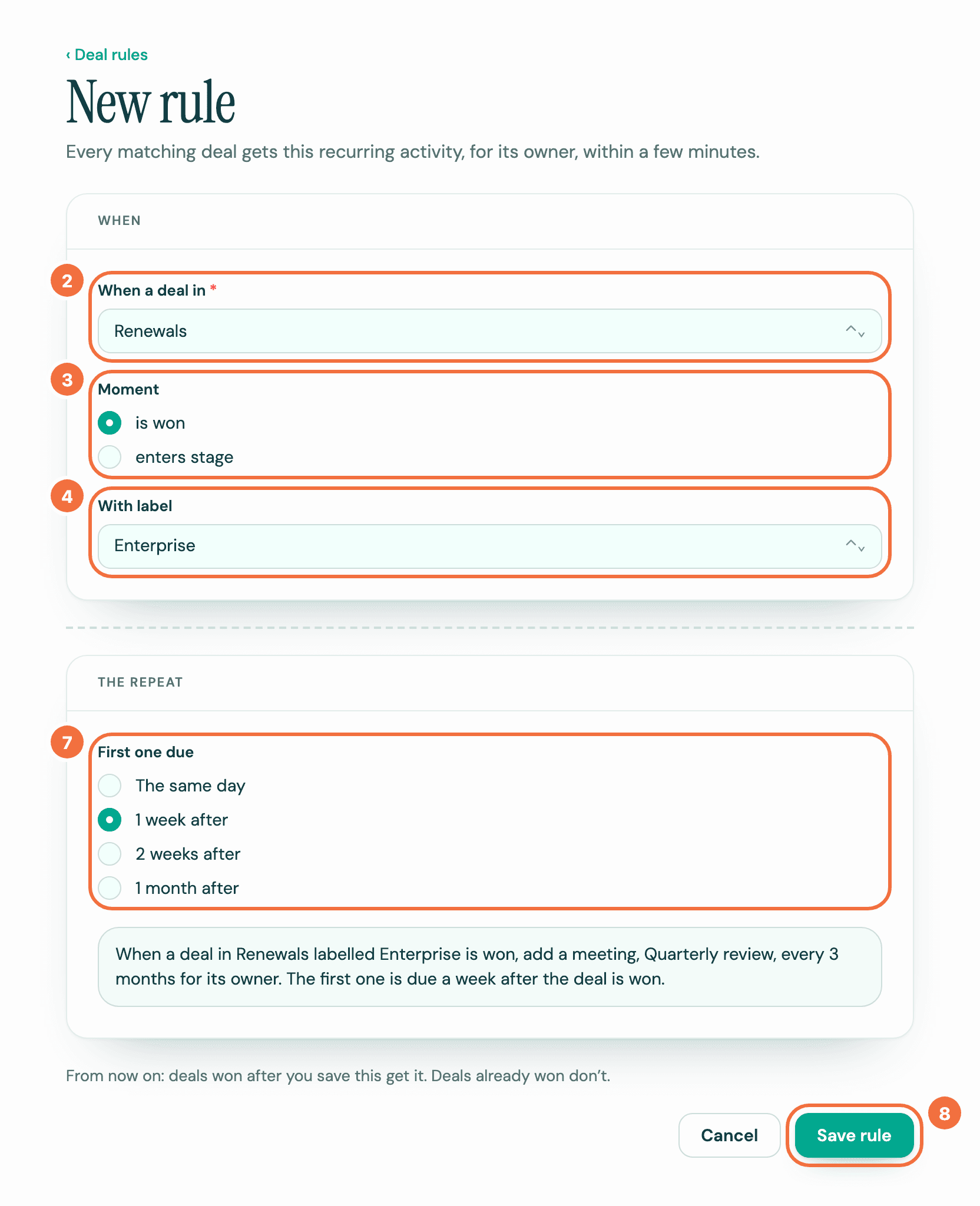
- Select Deal rules in the menu, then New rule.
- In When a deal in, choose the pipeline.
- Under Moment, choose is won, or choose enters stage and then the stage in Stage.
- In With label, keep Any label, or choose the label a deal must have.
- Under The activity, fill in Subject and Type, and anything else you need.
- Under The repeat, set how often it repeats, as for any recurring activity. There is no owner, deal or start date to choose: each deal brings its own.
- Under First one due, choose The same day, 1 week after, 2 weeks after or 1 month after the deal is won or enters the stage.
- Read the sentence, which says the whole rule, and select Save rule.
Which deals get it
- Deals that reach the moment while this rule is on. Deals already won, or already in the stage, when you save it don't.
- A deal created already won, or created in the stage, counts. So does a deal moved into the stage from another pipeline.
- enters stage counts only for open deals. A deal that is already won gets nothing when it is moved into the stage: reopen the deal before you move it, or create it in the stage.
- With a label, the deal must have it at that moment. A label added afterwards doesn't count.
- A deal has one running recurring activity from each rule. Leaving the stage and coming back, or being won again, adds nothing while that one runs. Two rules each give a deal their own.
- If the deal is reassigned after it matched, its recurring activity keeps the old owner.
Whose time zone
A rule's time is in the time zone shown under Starts at: yours when you create the rule. To use another, select Change. The sentence names the zone after the time. Every recurring activity the rule makes uses the rule's time zone, never the deal owner's. If the owners are in different time zones, each gets the activity at the rule's time in the rule's zone, so it shows at a different hour for each of them. Changing a rule's zone reaches only the recurring activities it makes afterwards.
When a deal is lost or deleted
The recurring activities rules made on it end, and their screen says Ended: the deal was lost or Ended: the deal was deleted. No further activities are created.
- Lost: the activity already in Pipedrive stays on the deal, even the first one before its date: delete it there if you don't need it. Lyra Recurring shows that activity as Cancelled, but in Pipedrive it stays open until you delete it.
- Deleted: Pipedrive deletes the deal's activities with it, so nothing is left to delete.
This still happens after you turn the rule off or delete it: Lyra Recurring keeps listening for deal changes until nothing your rules made is running. A won deal keeps them. A recurring activity added by hand is never ended this way.
If it does not work
- A deal did not get it. See A deal did not get its recurring activity.
- The form says Pipedrive's pipelines could not be loaded, and Save rule can't be selected. Select Try again.
- New rule can't be selected. Pipedrive is disconnected: see Lyra Recurring says Pipedrive is disconnected.
- You open the form while Pipedrive is disconnected. The banner says so, and Save rule can't be selected. Select Reconnect in the banner first.
- The sentence under the form reads Choose a pipeline and fill in the activity to see the rule. The rule isn't complete yet. Fill in the pipeline and the activity, and the sentence appears.
Choose how to add your first recurring activity
Getting started shows the two ways to add recurring activities, from a deal in Pipedrive or with a deal rule, and which of them you have already done.
Add a recurring activity without leaving Pipedrive
Create a recurring activity from the Recurring activities panel on a deal, person or organization, with that record already linked.