

Make an activity repeat on several days each week
Create one recurring activity that puts an activity on each day you pick, such as every Monday and Thursday.
When you are done, one recurring activity creates an activity on each day you picked, every week or every few weeks.
- Select Recurring activities in the menu, then New recurring activity, and fill in the activity.
- Under The schedule, type 1 in Repeat every and choose Weeks in Unit. For every other week, type 2.
- In On which days, choose Custom and tick the days, for example Mon and Thu.
- Check the line under the days. It reads An activity on each day you tick, every week., or names the number of weeks.
- Select Create recurring activity.
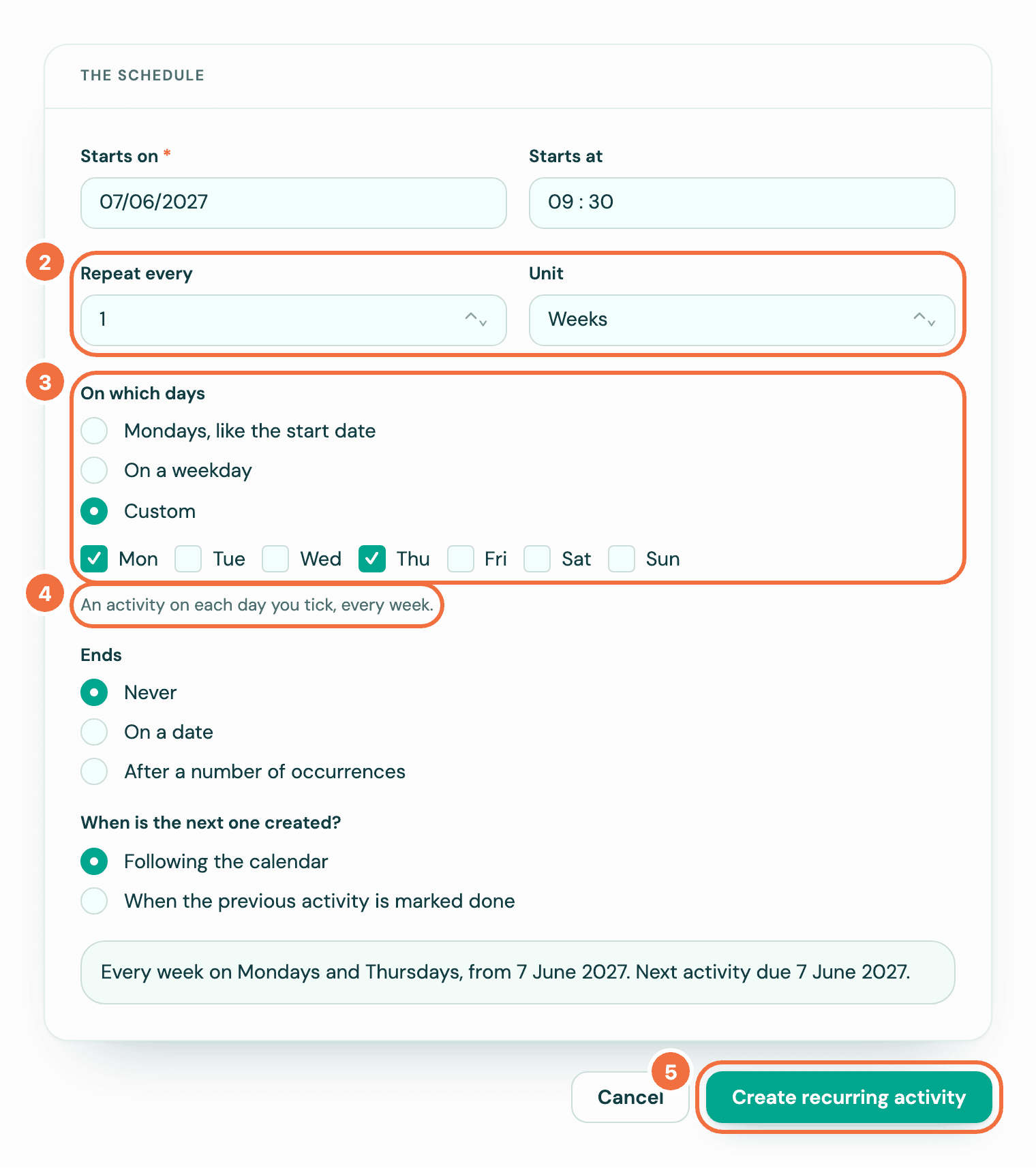
For example, starting on Monday 7 September 2026, every week on Mon and Thu, activities are due on 7, 10, 14 and 17 September, and so on. Every 2 weeks, they are due on 7 and 10 September, then 21 and 24 September.
Add a day to one you already have
- Open the recurring activity and select Edit.
- In On which days, choose Custom and tick the day you are adding, for example Thu beside Mon.
- Read the sentence at the bottom of the form. It says the open activity keeps its date, and the date the new repeat starts on.
- Select Save changes.
The activity already open keeps its date, and the new day's dates before it are not created. See Changing how often it repeats.
Weeks run Monday to Sunday
If your start date is not a day you ticked, the first activity is on the next day you ticked, and its week is the first one. Starting on Tuesday 8 September with Mon and Thu, the first activity is due on Thursday 10 September, the next on Monday 14 September.
Each day counts as one
- Set to stop after 10 times, Mon and Thu lasts five weeks. See Make a recurring activity stop on a date or after a number of times.
- A start date that has passed counts the missed activities on every day you ticked. See Start a recurring activity from a date that has passed.
If it does not work
- You get one activity a week. Check that Unit is Weeks and that you chose Custom. On a weekday with Weeks gives one activity each time, never on a Saturday or Sunday. With Days or Months, the line says A date that falls on a day you didn't tick moves to the next day you ticked.: the days you tick move a date, and add none.
- Choose at least one day of the week. Tick at least one day.
Make an activity land at the right time in another time zone
Set a recurring activity's time in a client's or a colleague's time zone, so it shows in Pipedrive at the hour you meant.
See who has connected Pipedrive, and remove a connection
Check that Lyra Recurring is connected, who in your company has connected, and remove someone's connection safely.