

Change a recurring activity from inside Pipedrive
Edit a recurring activity from the Recurring activities panel on a deal, person or organization, without opening Lyra Recurring.
When you are done, the recurring activity carries your change, and the panel row shows it.
-
In Pipedrive, open the deal, person or organization.
-
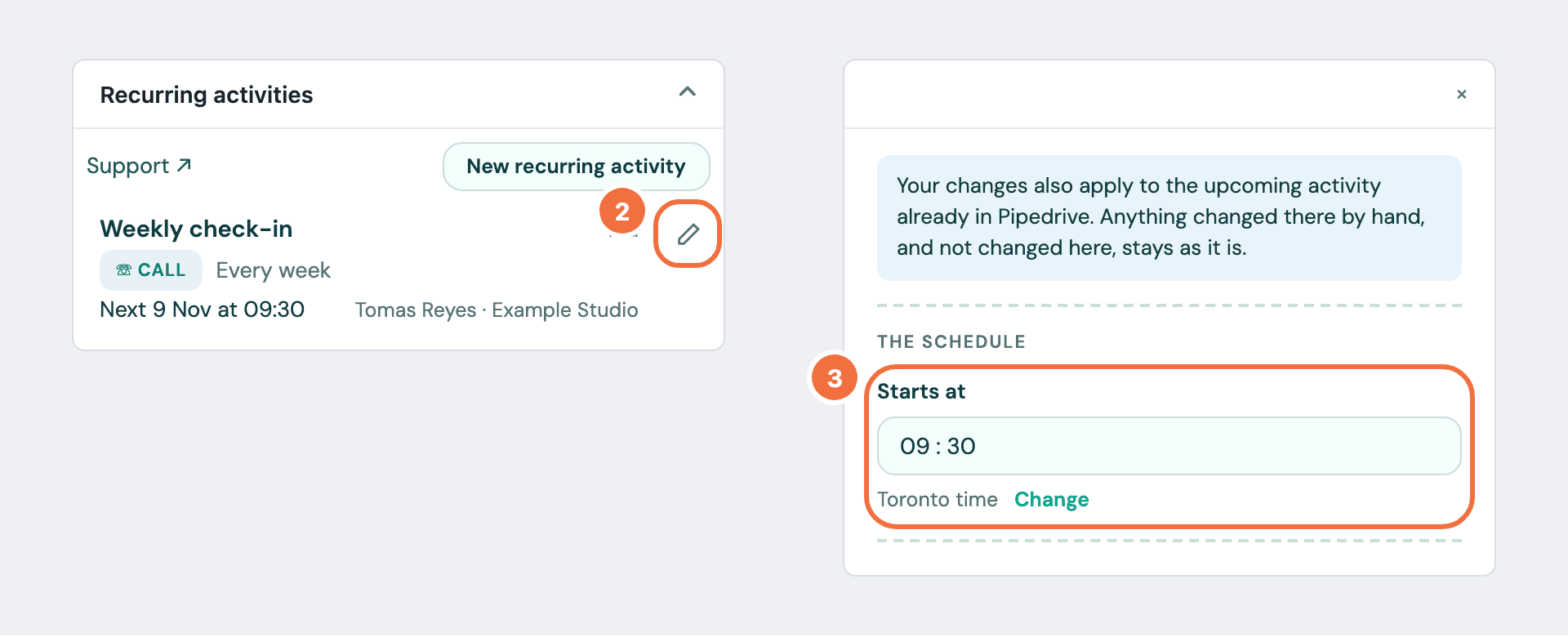
In the Recurring activities panel, select the pencil button beside the row. Its name is Edit followed by the subject.
-
A window opens over Pipedrive with the recurring activity's current values. Change what you need. To change the time zone, select Change under Starts at.
-
Select Save changes.
The window closes and the row shows the change.
Which activities change
The same as anywhere else. When there is an upcoming activity in Pipedrive, the notice at the top of the window says your edit reaches it too: Your changes also apply to the upcoming activity already in Pipedrive. Anything changed there by hand, and not changed here, stays as it is. The window says nothing after you save: to see that the upcoming activity was updated, open the recurring activity in Lyra Recurring. See Change a recurring activity.
Selecting the row itself
Selecting the row still opens the recurring activity in Lyra Recurring, in a new tab.
Anyone can edit any row
That includes a colleague's: what repeats on a shared record is shared.
If it does not work
- This recurring activity has been deleted. It can be restored in Lyra Recurring. Someone deleted it. Restore it in Lyra Recurring, then edit it. See Delete a recurring activity, or bring one back.
- We could not load this recurring activity. Select Try again.
- Pipedrive could not be reached. Try again shortly. Your changes are kept. Save again in a moment.
- You unlinked the record you were on. The row leaves this record's panel. The recurring activity still exists.
Delete a recurring activity, or bring one back
Stop a recurring activity by deleting it, see how many activities that cancels first, and restore it if you change your mind.
Find a recurring activity in your list
Search and filter your recurring activities by subject, type, owner, deal, person, organization or date.