

See a deal's recurring activities inside Pipedrive
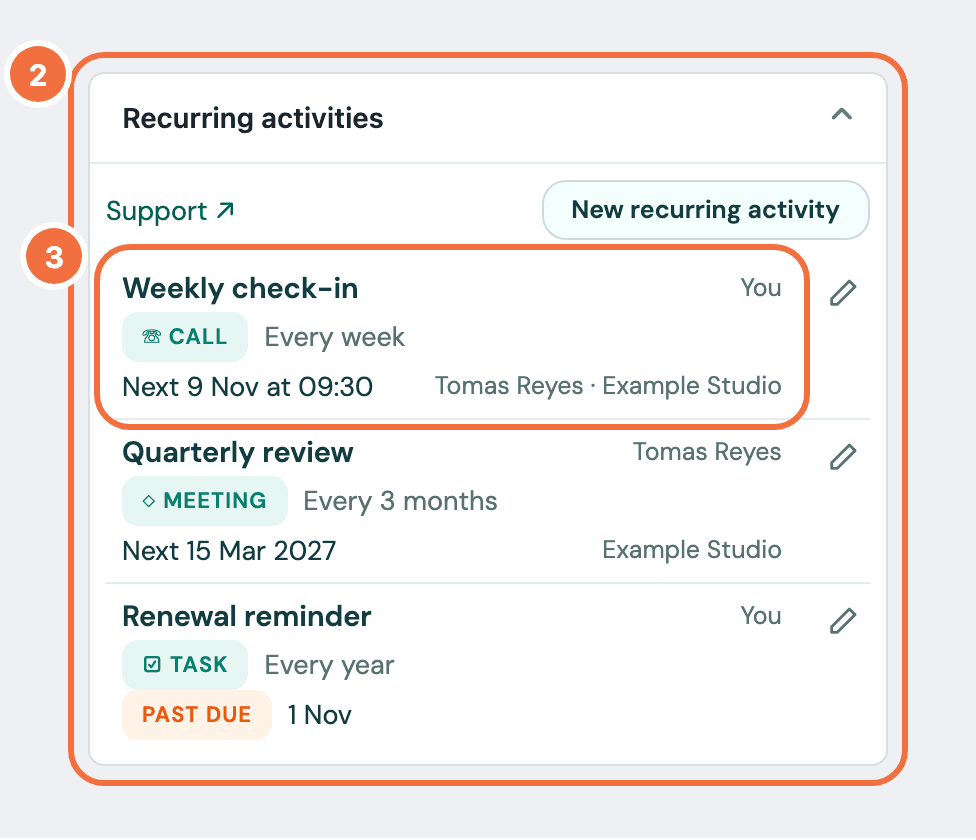
The Lyra Recurring panel on a deal, person or organization in Pipedrive lists what repeats on that record.
When you are done, you can see from any deal, person or organization in Pipedrive which recurring activities are set on it, who owns each one and when the next is due.
- In Pipedrive, open a deal, a person or an organization.
- Find the Recurring activities panel on that record.
- Read the list. Each row has three lines:
- the subject, and who owns it: You, or a colleague's name;
- the activity type and how often it repeats, for example Every 3 months;
- Next and the date, or Past due and the date once that date has passed in the activity's own time zone, or Finished; then the other records it is linked to. A time in a zone other than yours carries its zone, for example 09:30, Los Angeles time, and a time with no time zone carries UTC.
- Select a row to open that recurring activity in Lyra Recurring, in a new tab. You arrive signed in as yourself, with no password or link.
If that browser was signed in to Lyra Recurring as someone else, they are signed out and you are signed in. The screen says You are now signed in as … Whoever was signed in here before has been signed out.
What it lists
Recurring activities linked to this exact record. On a deal, that is the ones that name the deal, not those on the deal's person or organization. Your colleagues' are listed too.
Those a deal rule added are listed the same way, with no mark of their own. When the deal is lost, they show Finished. Open one to see which rule made it. Lyra Recurring shows its current activity as Cancelled, but in Pipedrive that activity stays open on the deal until you delete it.
Up to six
The panel shows the soonest six. A row with a sentence under it takes the room of two, so the panel may show fewer, and then it says how many. When there are more, select See all recurring activities for this deal (or person, or organization) to open the full list in Lyra Recurring, signed in the same way.
If it does not work
- Lyra Recurring is not connected to your Pipedrive account. You never connected, or your connection was removed in Settings. Select Connect Lyra Recurring and finish in the new tab. The panel updates when you come back.
- The panel also says Your company’s Lyra Recurring account has been closed. Connecting starts a new, empty account. If the account was closed by mistake, write to support first. See Lyra Recurring says my company's account has been closed.
- Your Pipedrive connection needs reconnecting. or Pipedrive is disconnected. Nothing new is being created. Select Reconnect. The list is still shown below.
- Selecting a row opens the sign-in screen, saying We could not sign you in from Pipedrive. Usually Pipedrive's link had expired, for example after your computer slept. Select the recurring activity in Pipedrive again. Or sign in on that screen with your password, or with Email me a sign-in link if you installed from Pipedrive and never set one: either way you are taken to the recurring activity. If it happens every time, update your browser. See Sign in without a password, or reset it.
- The sign-in screen says We could not sign you in from Pipedrive: your company’s Lyra Recurring account has been closed. See Lyra Recurring says my company's account has been closed.
- The panel says it could not load the recurring activities. Select Try again.
- A row has a sentence under it. Lyra Recurring could not check that activity in Pipedrive, and the sentence says what to do. See I marked an activity done and the next one did not appear.
- A row shows "A colleague" or "A deal" instead of a name. Pipedrive did not send the name. The recurring activity itself is fine.
Make an activity repeat only on weekdays or chosen days
Keep recurring activities off weekends, or limit them to the days you pick, such as Monday and Thursday.
See what a recurring activity created, and who changed it
Open a recurring activity to see every activity it created, whether each reached Pipedrive, and every change with who made it.