

See what a recurring activity created, and who changed it
Open a recurring activity to see every activity it created, whether each reached Pipedrive, and every change with who made it.
When you are done, you know what a recurring activity has done: which activities it created, where each one stands, and who changed what.
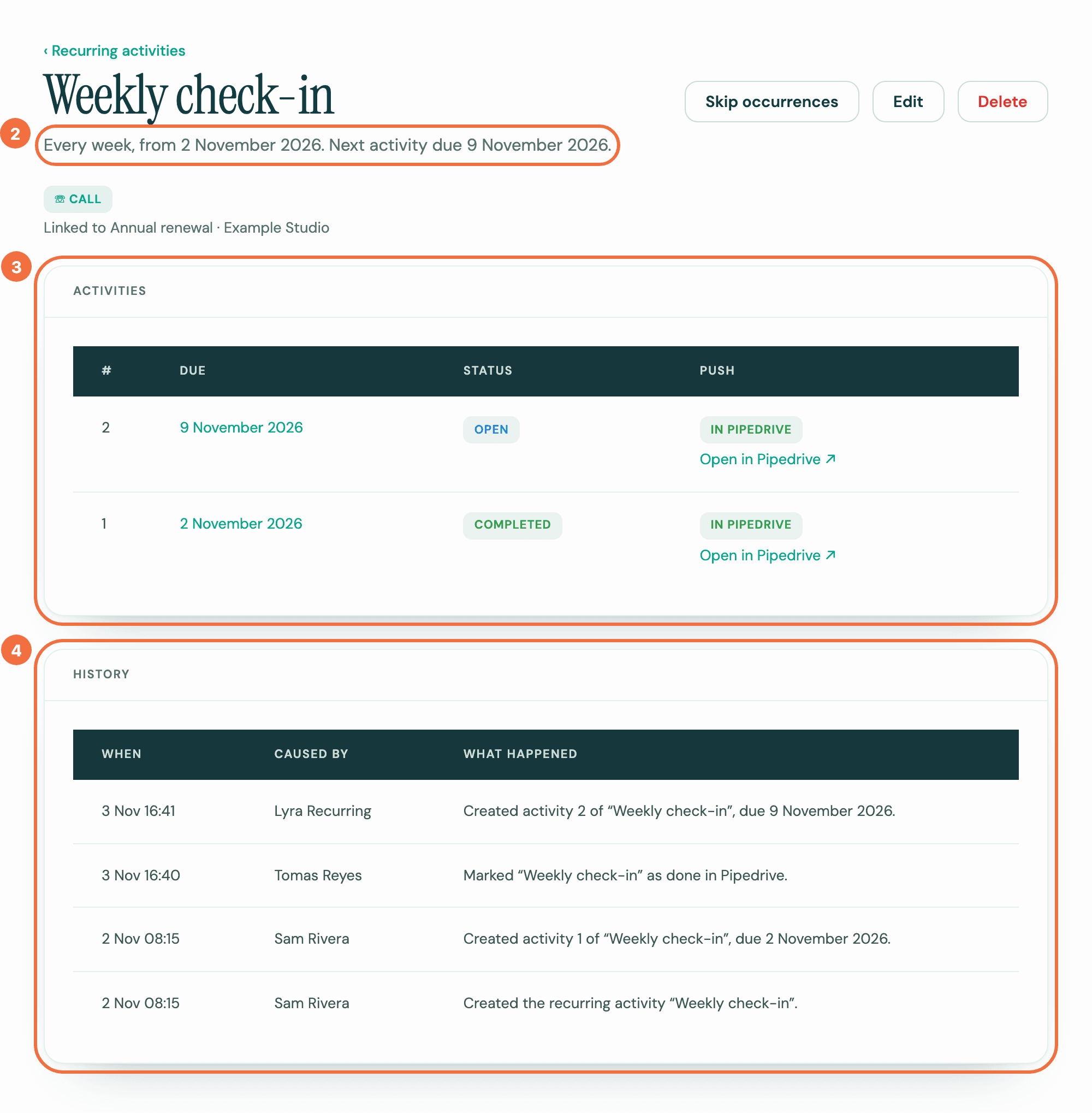
- Select Recurring activities in the menu, then the subject of the one you want.
- At the top, the sentence under the title says how it repeats and when the next activity is due. When the next activity is overdue, it ends with that activity's own date and time instead, for example "Next activity overdue since 27 October 2026, at 09:00.", then "The ones after it are at 11:00." if the later ones are at another time or in another zone. When the overdue activity has no time, it reads "Next activity overdue since 27 October 2026, with no time."
- Under Activities, each row is one activity it created:
- #: its number in the series.
- Due: its date. Select it to open that activity.
- Status: open, completed or cancelled, or Past due when its date has passed in its own time zone and it is still open. An activity due today is not past due.
- Push: whether it reached Pipedrive. In Pipedrive has an Open in Pipedrive link. After an edit, the upcoming activity reads Updating in Pipedrive until Pipedrive has the change.
- Under History, each row is something that happened: When, Caused by, and What happened.
Who Caused by names
A person in your company is named. What Lyra Recurring did by itself, such as creating an activity on schedule or sending your edit to the upcoming activity in Pipedrive, shows Lyra Recurring. Something our support team did for you shows Lyra Recurring support.
What a deal rule did, such as creating the recurring activity or ending it when the deal was lost, shows "Deal rule:" and the rule's subject, linking to the rule. If the rule has since been deleted, it reads "Deal rule (deleted)". It never names the person who wrote the rule. See Add a recurring activity to every deal that is won or enters a stage.
A change made in Pipedrive, such as marking an activity done there, shows the name of whoever made it, as Pipedrive names them, whether or not they use Lyra Recurring. Its What happened says "in Pipedrive".
- A colleague who uses Lyra Recurring is shown by their name there. Anyone else keeps, on each row, the name Pipedrive gave them at the time.
- When Pipedrive could not give a name, for example for a user it does not list, the row shows Pipedrive User ID and that user's number in your Pipedrive company.
- When Pipedrive did not say who made the change, the row shows Pipedrive.
Rows recorded before Lyra Recurring kept these names stay as they were.
If someone un-marks an activity as done in Pipedrive, its Status goes back to Open, or Past due if its date has passed. History shows it by their name, as "Marked “Weekly check-in” as not done in Pipedrive.", or "Marked “Weekly check-in” as not done and changed its due date and due time in Pipedrive." when they changed it in the same save.
When support acts for you
To fix a problem, Lyra Recurring support can act as one person in your company for up to 30 minutes. While acting, support can create, change, skip, delete or restore a recurring activity, send an activity to Pipedrive again, and select Register under Reporting changes in Settings. Register sets up change reporting again for your whole company, through any working connection in it, and checks for completions made while reporting was off. Support can't connect or remove Pipedrive, or change anyone's email address or password. Support doesn't ask each time.
Each change support makes to a recurring activity this way shows in its history, in Caused by, as "Lyra Recurring support, acting as" and that person's name, for example "Lyra Recurring support, acting as Anna Silva". If that person has no name in Lyra Recurring, it reads "Lyra Recurring support, acting as someone at your company". What happened reads as it would if that person had made the change. Register is the one change that belongs to no recurring activity, so a Register by support shows in no history you can open.
Pipedrive doesn't know that support made a change, so in Pipedrive it looks like any other change from Lyra Recurring. History here is where you see that support made it.
Times and time zones
A time in a zone other than yours carries its zone, for example 09:30, Los Angeles time, and a time with no time zone carries UTC. Each activity row shows that activity's own zone. A change of time zone moves the upcoming activity to the new zone, but an overdue one keeps its own. The sentence under the title then gives both times, each with its zone, for example "Next activity overdue since 27 October 2026, at 09:00, Toronto time. The ones after it are at 12:00, Paris time."
History also records where the time zone came from, Time zone set to …, from …’s Pipedrive settings. or Time zone set to …, from its deal rule., and Changed the time zone from … to …. when someone changes it. Lines about activities moved to a new time are explained in My activities in Pipedrive moved to a new time.
When you change it
Each save shows once under your name, naming every field it changed, in the form's order, for example "Changed owner and start time on “Weekly call”." "Repeat mode" in a row is the form's When is the next one created?, and "description" is its Public description, not the note. A save that changes nothing adds no row.
The upcoming activity's own history shows that row too, when the edit changed that activity. An overdue activity keeps its date and time, so a change to Starts at alone shows on the recurring activity only.
When Pipedrive has the change, a row by Lyra Recurring follows: Upcoming activity updated in Pipedrive …., or Upcoming activity moved to … in Pipedrive …. when its date moved. For an activity that was overdue when the change was sent, it reads Overdue activity updated in Pipedrive …., and keeps saying so after the activity is done. If the change didn't reach Pipedrive, the row says why, starting "The upcoming activity due …" or "The overdue activity due …", and most end It still has the old details: change it in Pipedrive. See Not updated in Pipedrive.
One activity's own history
Open an activity from Due to see its details and the history of that activity alone.
If it does not work
- The Push column says something other than In Pipedrive. See An activity is not showing in Pipedrive.
- Could not load this history. Select Try again, or reload the page.
See a deal's recurring activities inside Pipedrive
The Lyra Recurring panel on a deal, person or organization in Pipedrive lists what repeats on that record.
Sign in without a password, or reset it
Get an email link that signs you in, or choose a new password, including for an account created from Pipedrive.