

Make an activity repeat only on weekdays or chosen days
Keep recurring activities off weekends, or limit them to the days you pick, such as Monday and Thursday.
When you are done, every activity falls on a day you allow. A date that lands on any other day moves forward to the next allowed day. To get an activity on each of several days every week, see Make an activity repeat on several days each week.
- Open the form: New recurring activity, or Edit on an existing recurring activity.
- Under The schedule, find On which days.
- Choose one:
- The first choice keeps the start date's day, whichever day of the week that is, and says which: for example "Thursdays, like the start date" with Weeks, "On the 15th, like the start date" with Months, or "On 14 March, like the start date" with Years. With Days it reads Every day, or for example "Every 3 days, any day of the week". Before you pick a start date it reads, for example, "The start date's day of the week". Where there is no one start date, it names each activity's own day: "The first activity's day of the week" on a deal rule, and "Each activity's own day of the week" with several activities selected in the Activities list.
- On a weekday (Weekdays when Unit is Days): Monday to Friday. A date that falls on a Saturday or Sunday moves to the Monday, and the line under the choice says so. On a deal rule, or with several activities selected, the line reads An activity on a weekend moves to the Monday.
- Custom: tick the days you want, from Mon to Sun. Pick at least one. The line under the days says what they do. It is not offered when Unit is Years, because a yearly activity falls on one date.
- Check the sentence at the bottom of the form. It says what the days do, for example "a weekend date moves to the Monday". With Custom and no day ticked, it reads Tick at least one day to see when this activity will run.
- Save.
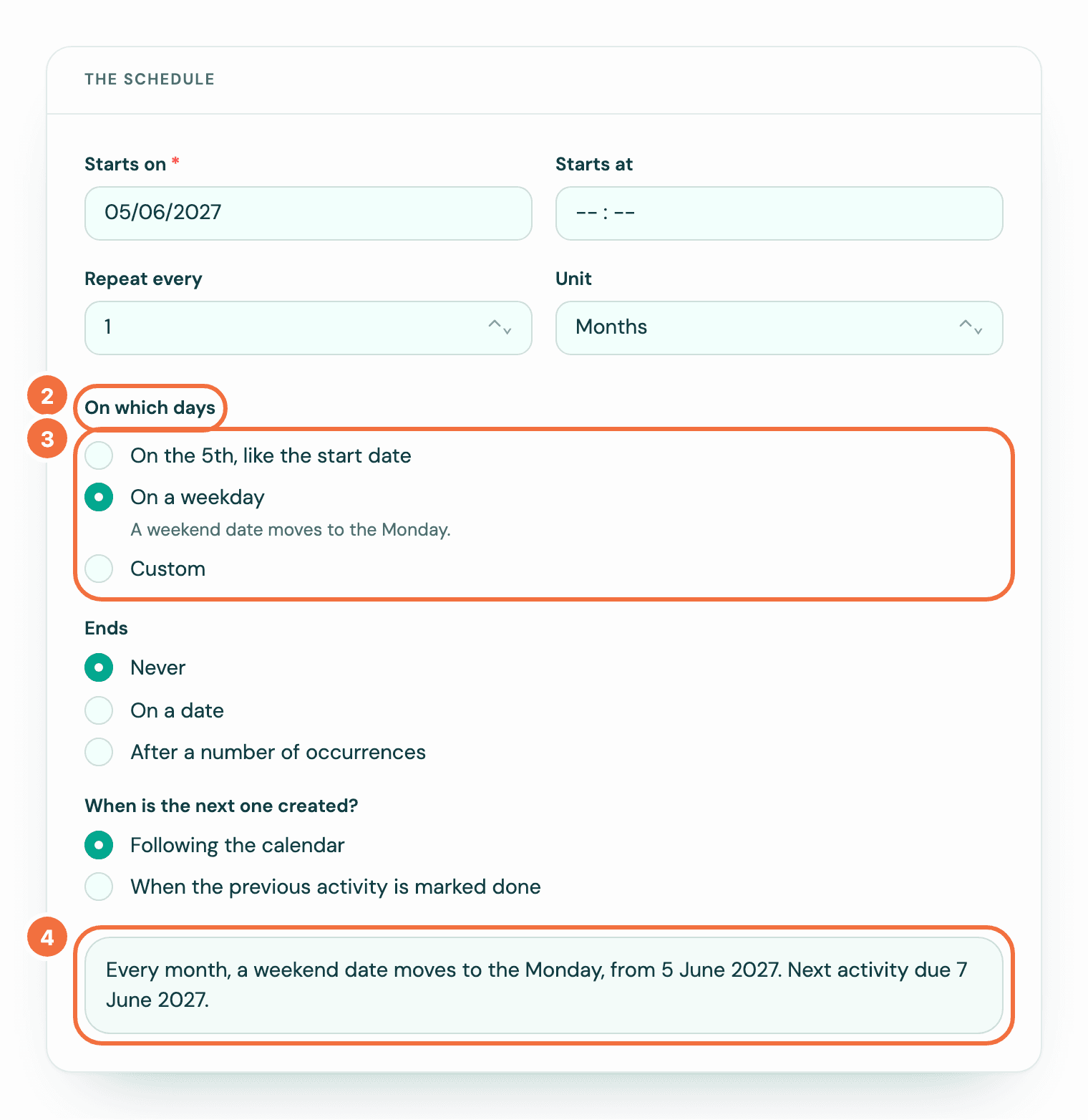
For example, a monthly recurring activity starting on Saturday 5 September 2026, set to On a weekday, has its first activity due on Monday 7 September.
Days work with the repeat
- Repeat every 1 Days with Weekdays gives you one activity every working day. The sentence says "weekdays only", and no line shows under Weekdays.
- Days every 2 or more with Weekdays, or Months or Years with On a weekday: A weekend date moves to the Monday.
- Weeks with On a weekday: A weekend start date moves to the Monday.
- Repeat every 1 Weeks with Custom Mon and Thu gives you two activities a week, one on each day: An activity on each day you tick, every week.
- With Days or Months, the days you tick move a date and add none: A date that falls on a day you didn't tick moves to the next day you ticked. The sentence names them, for example "a date that is not a Monday or Thursday moves to the next one".
When a date moves
A moved date is moved for that activity only. A monthly or yearly activity goes back to its own date the next time: one on the 15th, set to On a weekday, moves from Saturday 15 August 2026 to Monday 17 August, and is due on Tuesday 15 September. One every few days carries on from the day it moved to.
A weekly activity on On a weekday moves only once. If it starts on a Saturday, the first activity is due on the Monday, and every one after it falls on a Monday too. It does not move every week. With Custom days, if the start date is not a day you ticked, the first activity is on the next day you ticked.
In the list
In Recurring activities, the Repeats column shows how often on its first line, for example "Every month on the 15th, on a weekday", and when it runs below it in grey, for example "From 15 Oct 2026". The next activity's date is in the Next column.
If it does not work
- Choose at least one day of the week. You chose Custom with no day ticked. Tick at least one.